Data visualization in user experience design
Data visualization in user experience design
We are living in an era where data floods every corner of life. From health tracking apps to business dashboards, users are constantly exposed to digital information.
We are living in an era where data floods every corner of life. From health tracking apps to business dashboards, users are constantly exposed to digital information.


1. What is Data Visualization?
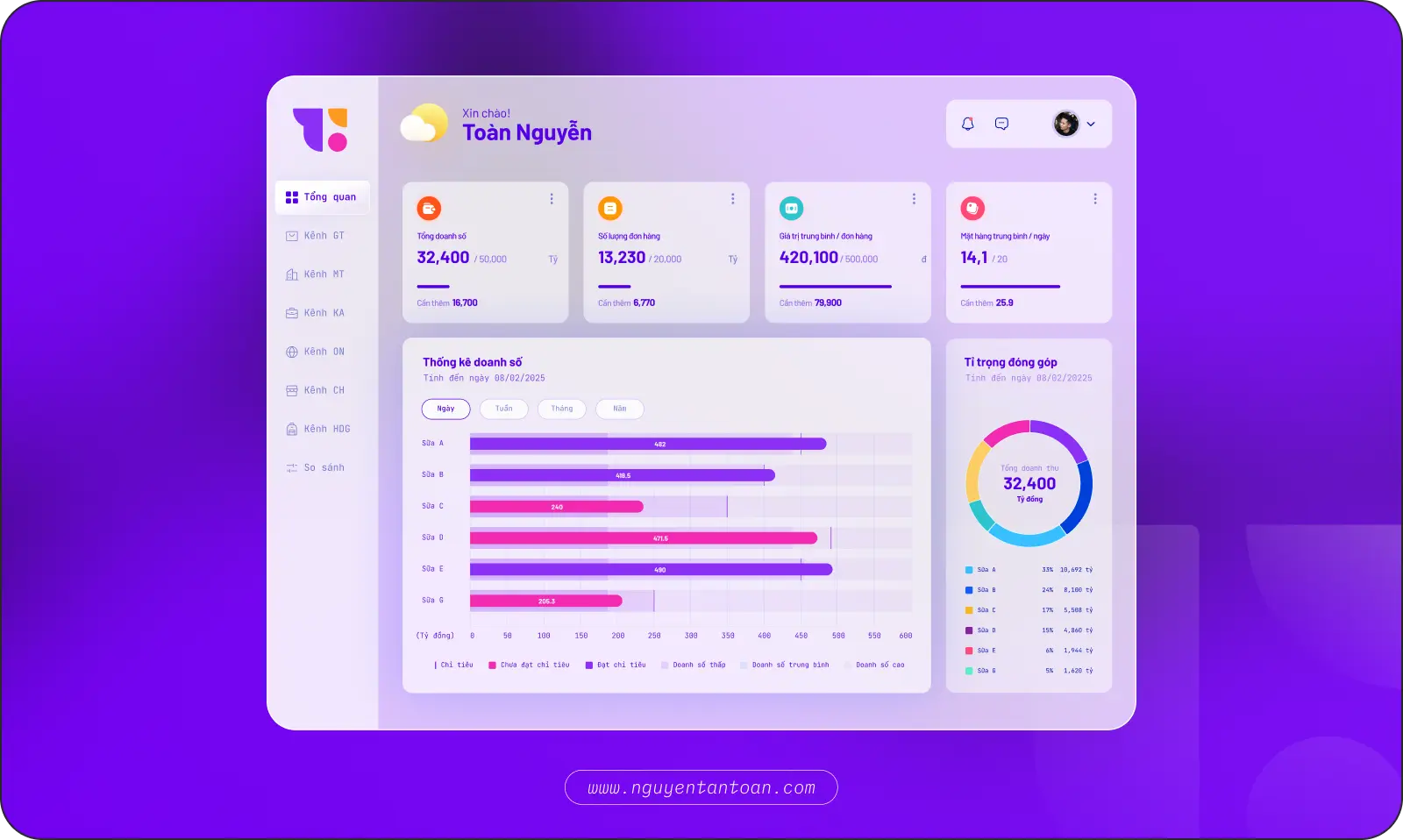
Data visualization is the process of converting numerical data into visual representations such as charts, graphs, maps, or infographics. The goal is to help users quickly grasp information, detect trends, and make accurate decisions.
From charts, tables, graphs, maps to diagrams and infographics, each form has its own strengths. Some help in comparison, some illustrate relationships, and others emphasize trends or distributions. Choosing the right type of visualization not only helps in presenting data effectively but also shapes the user experience — from admin dashboards to health tracking applications or product reports.
For example, a line chart can show revenue growth over time, while a heatmap can indicate the areas where users interact the most on a website.
2. Why is Data Visualization Important in UX/UI Design?
The human brain processes images faster than text. Presenting data in visual form helps users understand information quickly and accurately.
In digital products, presenting all data to users is not enough. From the perspective of the viewer, the data needs to be strategically organized – guiding users to important insights and supporting decision-making. A timely chart, a well-designed dashboard can convey more than hundreds of lines of text and numbers – and that is the advantage of products that know how to tell stories with data. Data visualization is extremely important for the following reasons.
2.1 Helps Users Understand Information Faster
The human brain processes images faster than text. Presenting data in visual form helps users understand information quickly and accurately.
2.2 Improves User Experience
Data visualization makes it easier for users to recognize trends, relationships, and anomalies in data without needing to dive deep into analysis.
2.3 Supports Data-Driven Design Decisions
Heatmaps and funnel analyses help designers identify bottlenecks and optimize actual user flows.
2.4 Increases Persuasiveness When Presenting Solutions
Tools like heatmaps or user behavior analyses provide insights into how users interact with products, thereby helping designers optimize interfaces and user flows.
3. The History of Data Visualization: From Clay Tablets to Smart Dashboards
As mentioned above, data visualization is the art of transforming data into images – from dry numbers into understandable, memorable, and actionable information. It not only clarifies what is happening but also opens up deeper insights into the bigger picture.
Interestingly, data visualization is not a modern invention. Clay tablets inscribed with symbols from ancient Sumerian civilization – over 4,000 years ago – were used to record and track financial silver amounts. More than 4,000 years ago, the ancient Sumerians etched symbols onto clay tablets to monitor silver and traded goods. These symbols were not only for memory but also for “seeing” – for financial management and communicating information. This is considered one of the most primitive forms of data visualization.

A turning point came in the 17th century when science and data began to intersect strongly. Fields like mathematics, astronomy, geography, and statistics successively created tools for representing data visually: line charts, heatmaps, scatter plots, network diagrams… At this point, we no longer just wrote about data – we began to “draw” it.

The 20th century witnessed the rise of computers. With the ability to process data quickly and accurately, visualization transitioned into a digital era. From simple charts in Excel to complex dashboard systems on BI (Business Intelligence) platforms, data was not only presented – it was also designed to update in real-time.
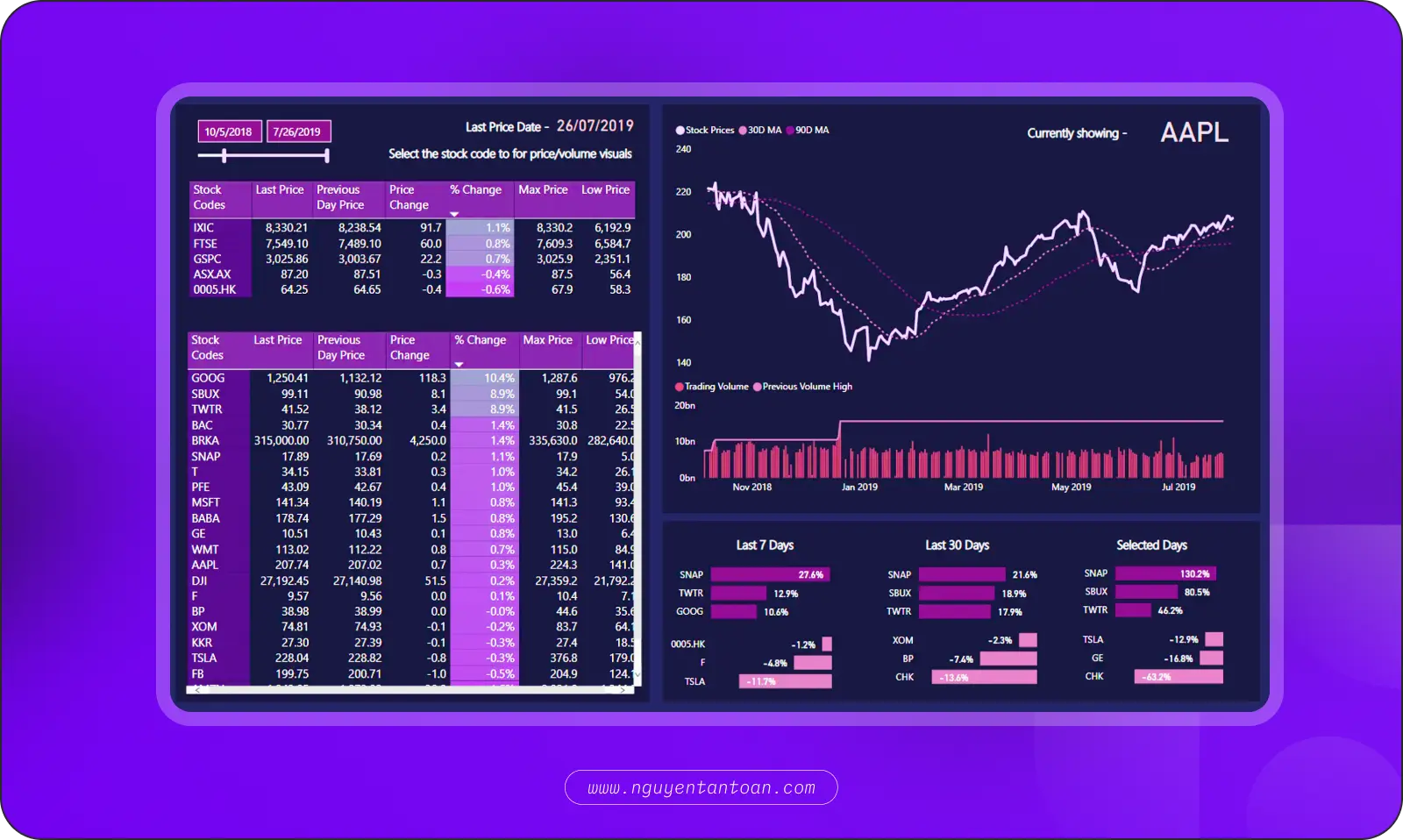
Today, data visualization is the right hand of business strategies, product design, organizational management, and personalized user experiences. In the context of big data and the evolution of AI, the role of visualization is no longer secondary – it is central. A well-designed dashboard not only displays information – it guides attention, highlights what is important, reduces cognitive load, and increases confidence in decision-making.
It can be said that data visualization has evolved from a tool into a language. This language does not use words – but images. It tells stories not with sentences – but with insights. And if you want your product to be understood, trusted, and acted upon, you need to learn how to communicate in that very language.
4. Useful Principles When Visualizing Data in UX/UI Design
Data visualization is not just about “drawing pretty charts.” It is the art of transforming raw data into meaningful experiences – helping users see what matters, understand quickly, and act correctly.
4.1 Know Who Your Users Are
Don’t design charts for “everyone.” Understand who your users are, what roles they play (managers, operations staff, customers…), what their goals are, and what information they need to make decisions.
4.2 Understand the Business – Understand the Context of the Data
No data “speaks for itself.” Designers need to grasp the business logic and decision-making processes behind the data to know what to show, what to omit, and what to highlight.
4.3 Convey the Right Message
Each chart must answer a specific question. If you can’t clearly articulate: “What do users need to know here?”, then that data doesn’t need to be displayed.
4.4 Keep It Simple Yet Focused
Choose familiar, intuitive charts (bar, line, pie...) to increase comprehension. Avoid being overly creative or complex, which can cause viewers to waste time decoding.
4.5 Increase Interactivity – When Appropriate
Tooltips, filters, drill-downs, or segmentation help users explore deeper according to their personal needs without overwhelming the interface.
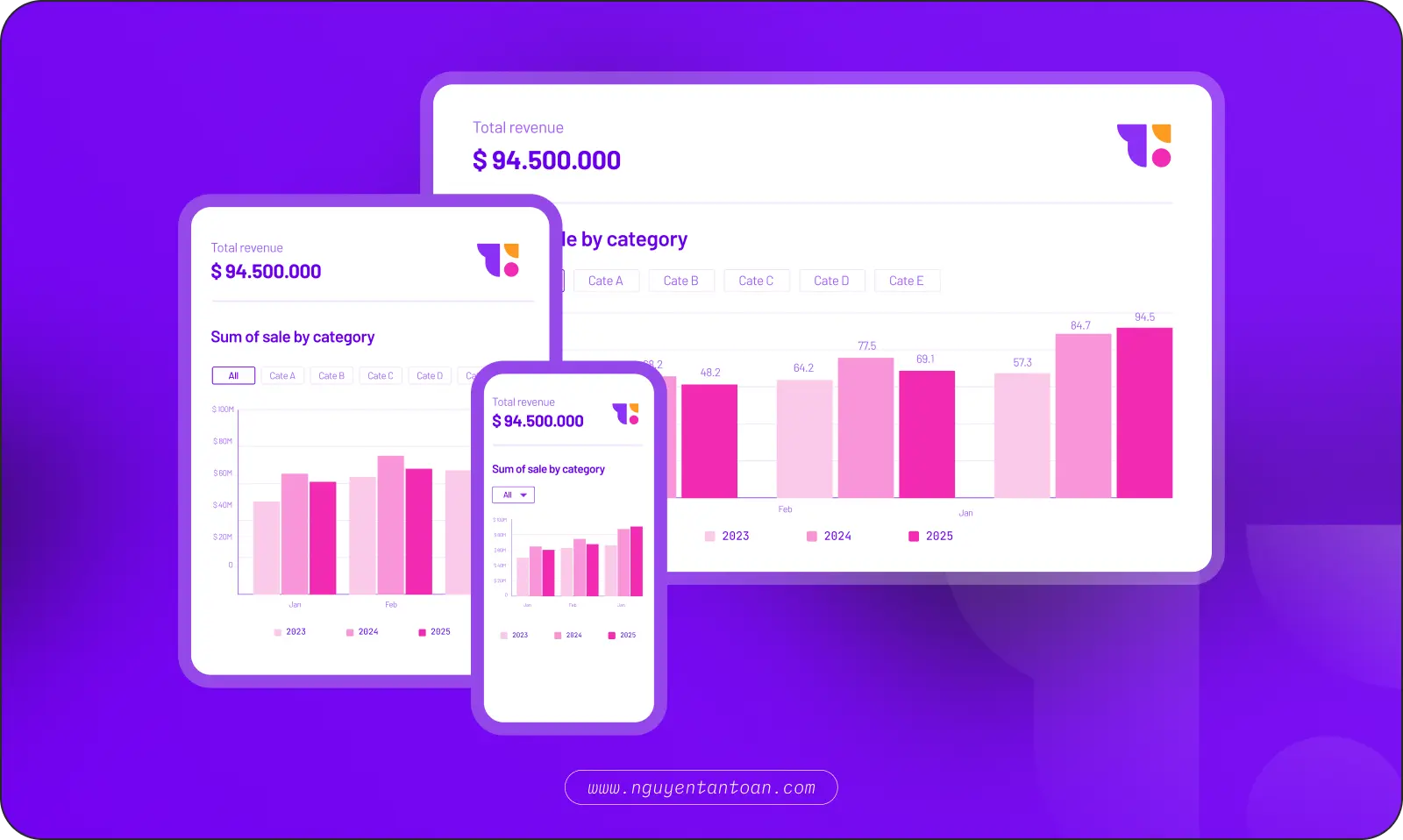
4.6 Optimize for All Devices
Data does not just reside on desktop. A good chart needs to be clear, easy to read, and easy to manipulate on tablets and mobile devices.
5. Challenges of Combining Data and User Experience (UX)
Combining data visualization and UX is not just about “drawing more charts” — it’s a strategic design problem that requires careful consideration. Here are four common challenges:
5.1 Information Overload
One of the biggest challenges of data visualization is presenting complex datasets in a way that is easy to understand and visually engaging. If you present too much data at once, the information can become overwhelming and difficult to interpret, defeating the purpose of data visualization. UX designers must find the balance between providing enough meaningful data without overwhelming users.
5.2 Compatibility in Design
Data visualization and user experience both require unique skills and knowledge. Integrating both can be challenging as designers must understand how to effectively convey data through visual cues while also making the user experience seamless and intuitive.
5.3 Bias
Data visualization can be affected by biases from the development team. For instance, if UX designers have a preconceived notion of how the data should look in their minds, they may present it in a way that supports their bias rather than accurately reflecting the data. UX designers must be aware of this risk and strive to eliminate bias from the design process.
5.4 Technical Limitations
Combining UX design and data visualization can also present technical challenges. Ensuring that available technology and infrastructure can effectively support both the design and data visualization can be a complex task. This requires collaboration among relevant departments including designers, software development engineers, and data science engineers to ensure that the final product meets the needs of all stakeholders.
6. Building a User Experience Design Strategy to Integrate Data Visualization
Combining data visualization and UX is not just about “drawing more charts” — it’s a strategic design challenge that requires careful consideration. Here are four common challenges:
6.1 Information Overload
First, you need to define the goals and objectives of the project. Identify which data is truly necessary and helpful for the viewer to achieve their goals. This helps guide the design process and ensures that the final product is relevant and useful.
6.2 Analyzing User Needs (User-Centric Design)
Understanding the specific user demographic is crucial for creating effective design. Conduct user research to gather information about user needs and objectives, and then use this information to inform the design process.
6.3 Information Overload
Visualization requires accuracy, UX requires simplicity. Designers must know how to represent complex data in a visually intuitive and easy-to-understand way without losing reliability or user experience. If too much data is presented, users may lose sight of what is important. The design should prioritize the order of information, reduce noise, and only display actionable data.
6.4 Choose the Appropriate Chart to Represent Data
Create a prototype or a test model to evaluate the execution of visualization and user experience. This helps you adjust and improve the design before deployment.
6.5 Create a Prototype
Designing pretty charts is one thing; displaying them correctly in an actual product is another. This requires close collaboration between UX, Data, Dev, and Product teams to ensure performance, interactivity, and data accuracy.
6.6 Testing and Adjusting
Conduct usability tests to gather feedback on the design and use this feedback to make iterative improvements. You may need to experiment with multiple design options to identify which solution works best for your target audience.
6.7 Maintenance and Updates
Continuously monitor and update your dashboard or other user interfaces to ensure that they remain relevant and useful. This may involve updating both the data and the type of visualization used, as well as improving the user experience.
7. Tools to Support Data Visualization for UX/UI Designers
Figma Plugins: Chart, Datavizer, Google Sheet Sync.
Tableau / Looker Studio: For advanced reporting or dashboards.
Recharts / D3.js / Chart.js: For front-end knowledgeable devs & designers.
Notion, Canva, Excel: For internal reports, quick mockups.
8. Conclusion
Data visualization is not just a supporting tool but an essential part of user experience design. By transforming data into visual stories, we not only help users understand information but also create memorable and effective experiences.
Leading businesses are harnessing this power to turn complex data into intuitive user interfaces. This is the key to increasing conversion rates and building customer loyalty.
1. What is Data Visualization?
Data visualization is the process of converting numerical data into visual representations such as charts, graphs, maps, or infographics. The goal is to help users quickly grasp information, detect trends, and make accurate decisions.
From charts, tables, graphs, maps to diagrams and infographics, each form has its own strengths. Some help in comparison, some illustrate relationships, and others emphasize trends or distributions. Choosing the right type of visualization not only helps in presenting data effectively but also shapes the user experience — from admin dashboards to health tracking applications or product reports.
For example, a line chart can show revenue growth over time, while a heatmap can indicate the areas where users interact the most on a website.
2. Why is Data Visualization Important in UX/UI Design?
The human brain processes images faster than text. Presenting data in visual form helps users understand information quickly and accurately.
In digital products, presenting all data to users is not enough. From the perspective of the viewer, the data needs to be strategically organized – guiding users to important insights and supporting decision-making. A timely chart, a well-designed dashboard can convey more than hundreds of lines of text and numbers – and that is the advantage of products that know how to tell stories with data. Data visualization is extremely important for the following reasons.
2.1 Helps Users Understand Information Faster
The human brain processes images faster than text. Presenting data in visual form helps users understand information quickly and accurately.
2.2 Improves User Experience
Data visualization makes it easier for users to recognize trends, relationships, and anomalies in data without needing to dive deep into analysis.
2.3 Supports Data-Driven Design Decisions
Heatmaps and funnel analyses help designers identify bottlenecks and optimize actual user flows.
2.4 Increases Persuasiveness When Presenting Solutions
Tools like heatmaps or user behavior analyses provide insights into how users interact with products, thereby helping designers optimize interfaces and user flows.
3. The History of Data Visualization: From Clay Tablets to Smart Dashboards
As mentioned above, data visualization is the art of transforming data into images – from dry numbers into understandable, memorable, and actionable information. It not only clarifies what is happening but also opens up deeper insights into the bigger picture.
Interestingly, data visualization is not a modern invention. Clay tablets inscribed with symbols from ancient Sumerian civilization – over 4,000 years ago – were used to record and track financial silver amounts. More than 4,000 years ago, the ancient Sumerians etched symbols onto clay tablets to monitor silver and traded goods. These symbols were not only for memory but also for “seeing” – for financial management and communicating information. This is considered one of the most primitive forms of data visualization.
A turning point came in the 17th century when science and data began to intersect strongly. Fields like mathematics, astronomy, geography, and statistics successively created tools for representing data visually: line charts, heatmaps, scatter plots, network diagrams… At this point, we no longer just wrote about data – we began to “draw” it.
The 20th century witnessed the rise of computers. With the ability to process data quickly and accurately, visualization transitioned into a digital era. From simple charts in Excel to complex dashboard systems on BI (Business Intelligence) platforms, data was not only presented – it was also designed to update in real-time.
Today, data visualization is the right hand of business strategies, product design, organizational management, and personalized user experiences. In the context of big data and the evolution of AI, the role of visualization is no longer secondary – it is central. A well-designed dashboard not only displays information – it guides attention, highlights what is important, reduces cognitive load, and increases confidence in decision-making.
It can be said that data visualization has evolved from a tool into a language. This language does not use words – but images. It tells stories not with sentences – but with insights. And if you want your product to be understood, trusted, and acted upon, you need to learn how to communicate in that very language.
4. Useful Principles When Visualizing Data in UX/UI Design
Data visualization is not just about “drawing pretty charts.” It is the art of transforming raw data into meaningful experiences – helping users see what matters, understand quickly, and act correctly.
4.1 Know Who Your Users Are
Don’t design charts for “everyone.” Understand who your users are, what roles they play (managers, operations staff, customers…), what their goals are, and what information they need to make decisions.
4.2 Understand the Business – Understand the Context of the Data
No data “speaks for itself.” Designers need to grasp the business logic and decision-making processes behind the data to know what to show, what to omit, and what to highlight.
4.3 Convey the Right Message
Each chart must answer a specific question. If you can’t clearly articulate: “What do users need to know here?”, then that data doesn’t need to be displayed.
4.4 Keep It Simple Yet Focused
Choose familiar, intuitive charts (bar, line, pie...) to increase comprehension. Avoid being overly creative or complex, which can cause viewers to waste time decoding.
4.5 Increase Interactivity – When Appropriate
Tooltips, filters, drill-downs, or segmentation help users explore deeper according to their personal needs without overwhelming the interface.
4.6 Optimize for All Devices
Data does not just reside on desktop. A good chart needs to be clear, easy to read, and easy to manipulate on tablets and mobile devices.
5. Challenges of Combining Data and User Experience (UX)
Combining data visualization and UX is not just about “drawing more charts” — it’s a strategic design problem that requires careful consideration. Here are four common challenges:
5.1 Information Overload
One of the biggest challenges of data visualization is presenting complex datasets in a way that is easy to understand and visually engaging. If you present too much data at once, the information can become overwhelming and difficult to interpret, defeating the purpose of data visualization. UX designers must find the balance between providing enough meaningful data without overwhelming users.
5.2 Compatibility in Design
Data visualization and user experience both require unique skills and knowledge. Integrating both can be challenging as designers must understand how to effectively convey data through visual cues while also making the user experience seamless and intuitive.
5.3 Bias
Data visualization can be affected by biases from the development team. For instance, if UX designers have a preconceived notion of how the data should look in their minds, they may present it in a way that supports their bias rather than accurately reflecting the data. UX designers must be aware of this risk and strive to eliminate bias from the design process.
5.4 Technical Limitations
Combining UX design and data visualization can also present technical challenges. Ensuring that available technology and infrastructure can effectively support both the design and data visualization can be a complex task. This requires collaboration among relevant departments including designers, software development engineers, and data science engineers to ensure that the final product meets the needs of all stakeholders.
6. Building a User Experience Design Strategy to Integrate Data Visualization
Combining data visualization and UX is not just about “drawing more charts” — it’s a strategic design challenge that requires careful consideration. Here are four common challenges:
6.1 Information Overload
First, you need to define the goals and objectives of the project. Identify which data is truly necessary and helpful for the viewer to achieve their goals. This helps guide the design process and ensures that the final product is relevant and useful.
6.2 Analyzing User Needs (User-Centric Design)
Understanding the specific user demographic is crucial for creating effective design. Conduct user research to gather information about user needs and objectives, and then use this information to inform the design process.
6.3 Information Overload
Visualization requires accuracy, UX requires simplicity. Designers must know how to represent complex data in a visually intuitive and easy-to-understand way without losing reliability or user experience. If too much data is presented, users may lose sight of what is important. The design should prioritize the order of information, reduce noise, and only display actionable data.
6.4 Choose the Appropriate Chart to Represent Data
Create a prototype or a test model to evaluate the execution of visualization and user experience. This helps you adjust and improve the design before deployment.
6.5 Create a Prototype
Designing pretty charts is one thing; displaying them correctly in an actual product is another. This requires close collaboration between UX, Data, Dev, and Product teams to ensure performance, interactivity, and data accuracy.
6.6 Testing and Adjusting
Conduct usability tests to gather feedback on the design and use this feedback to make iterative improvements. You may need to experiment with multiple design options to identify which solution works best for your target audience.
6.7 Maintenance and Updates
Continuously monitor and update your dashboard or other user interfaces to ensure that they remain relevant and useful. This may involve updating both the data and the type of visualization used, as well as improving the user experience.
7. Tools to Support Data Visualization for UX/UI Designers
Figma Plugins: Chart, Datavizer, Google Sheet Sync.
Tableau / Looker Studio: For advanced reporting or dashboards.
Recharts / D3.js / Chart.js: For front-end knowledgeable devs & designers.
Notion, Canva, Excel: For internal reports, quick mockups.
8. Conclusion
Data visualization is not just a supporting tool but an essential part of user experience design. By transforming data into visual stories, we not only help users understand information but also create memorable and effective experiences.
Leading businesses are harnessing this power to turn complex data into intuitive user interfaces. This is the key to increasing conversion rates and building customer loyalty.
RELATED ARTICLE
RELATED ARTICLE
RECENT POST




ACCESSIBILITY
I believe that good design should be for everyone and am always committed to providing the most accessible experience. If you have trouble accessing the website, feel free to leave me a message.
NOTE
Website Design and Development by Toan Nguyen. Using the font Space Gortek (Colophon Foundry); Newseader (Production Type). Built on the Framer platform.
Copyright © 2018 – 2025 Toan Nguyen
ACCESSIBILITY
I believe that good design should be for everyone and am always committed to providing the most accessible experience. If you have trouble accessing the website, feel free to leave me a message.
NOTE
Website Design and Development by Toan Nguyen. Using the font Space Gortek (Colophon Foundry); Newseader (Production Type). Built on the Framer platform.
Copyright © 2018 – 2025 Toan Nguyen
ACCESSIBILITY
I believe that good design should be for everyone and am always committed to providing the most accessible experience. If you have trouble accessing the website, feel free to leave me a message.
NOTE
Website Design and Development by Toan Nguyen. Using the font Space Gortek (Colophon Foundry); Newseader (Production Type). Built on the Framer platform.
Copyright © 2018 – 2025 Toan Nguyen