Overcome Language Limits - The Future of AI Interface Goes Beyond Just Chat Box
Overcome Language Limits - The Future of AI Interface Goes Beyond Just Chat Box
Interacting through the chat box is just the first step. In the future, AI will blend in to the extent of becoming an essential and invisible part of all our interfaces.
Interacting through the chat box is just the first step. In the future, AI will blend in to the extent of becoming an essential and invisible part of all our interfaces.


Chatting with AI - Chat is just a "training wheel" for the AI era
In the AI wave of recent years, chat interfaces have almost become the default. ChatGPT, Claude, Gemini, and Copilot all open with the same interface: a rectangular chat window and an endless stream of conversations. This leads many to mistakenly believe that text chat is the optimal form of AI.
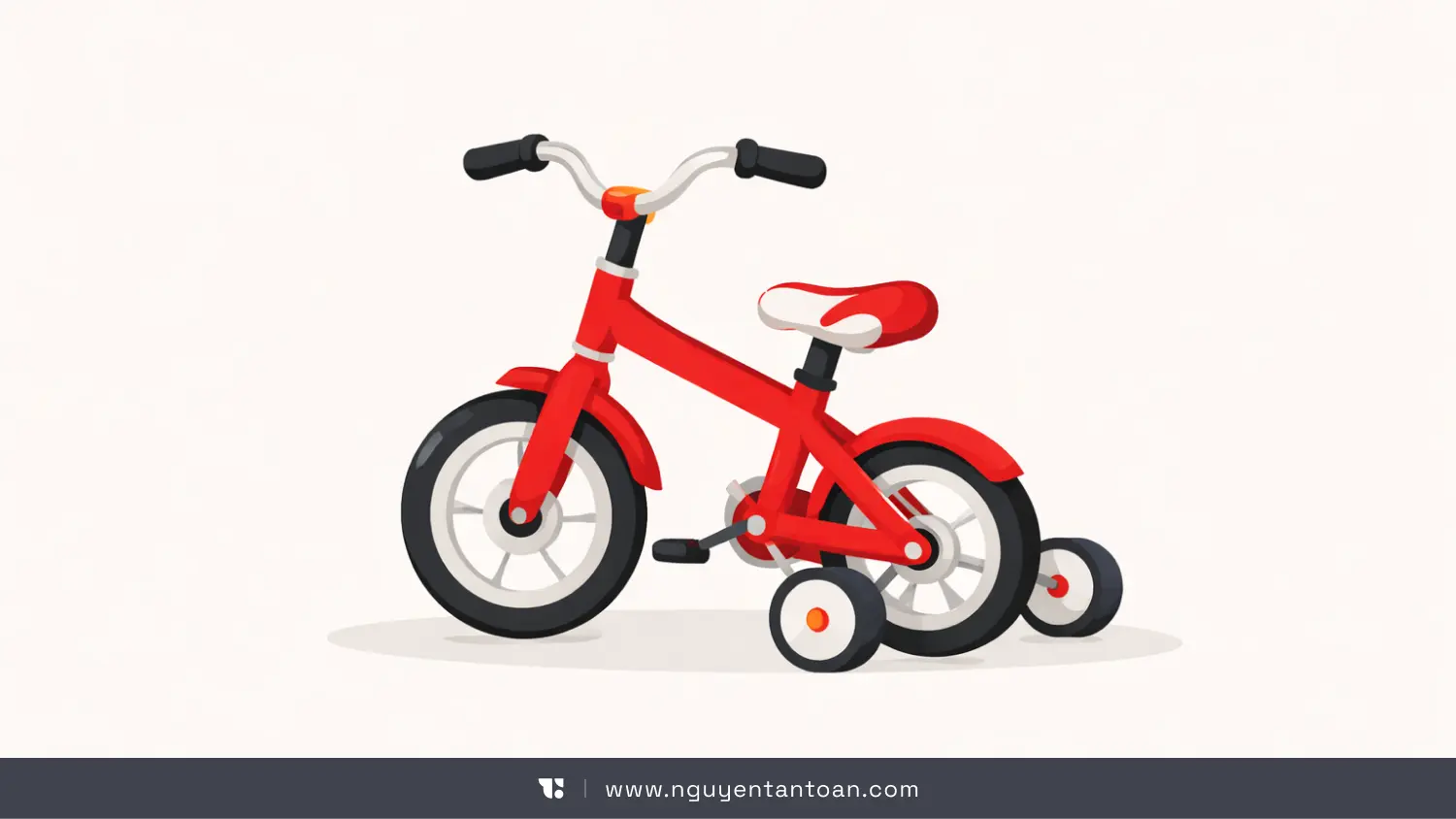
According to Alan Pike – a designer and AI experience researcher – chat is just like training wheels when learning to ride a bike. It is necessary to get acquainted, to lower initial barriers. But if you keep the training wheels forever, you will never accelerate.
The issue does not lie in AI's intelligence. Today's models are powerful enough to understand context, reason, critique, and even create. The issue lies in the interface that is stifling that capability.
Chat forces an extremely intelligent system to operate within limited confines: a sequential question-answering format, entirely dependent on the user verbally describing everything they are doing. This is fine at the familiarization stage. But if viewed as the long-term future, it will become a barrier.
Chat Interface - a modern form of "command line"
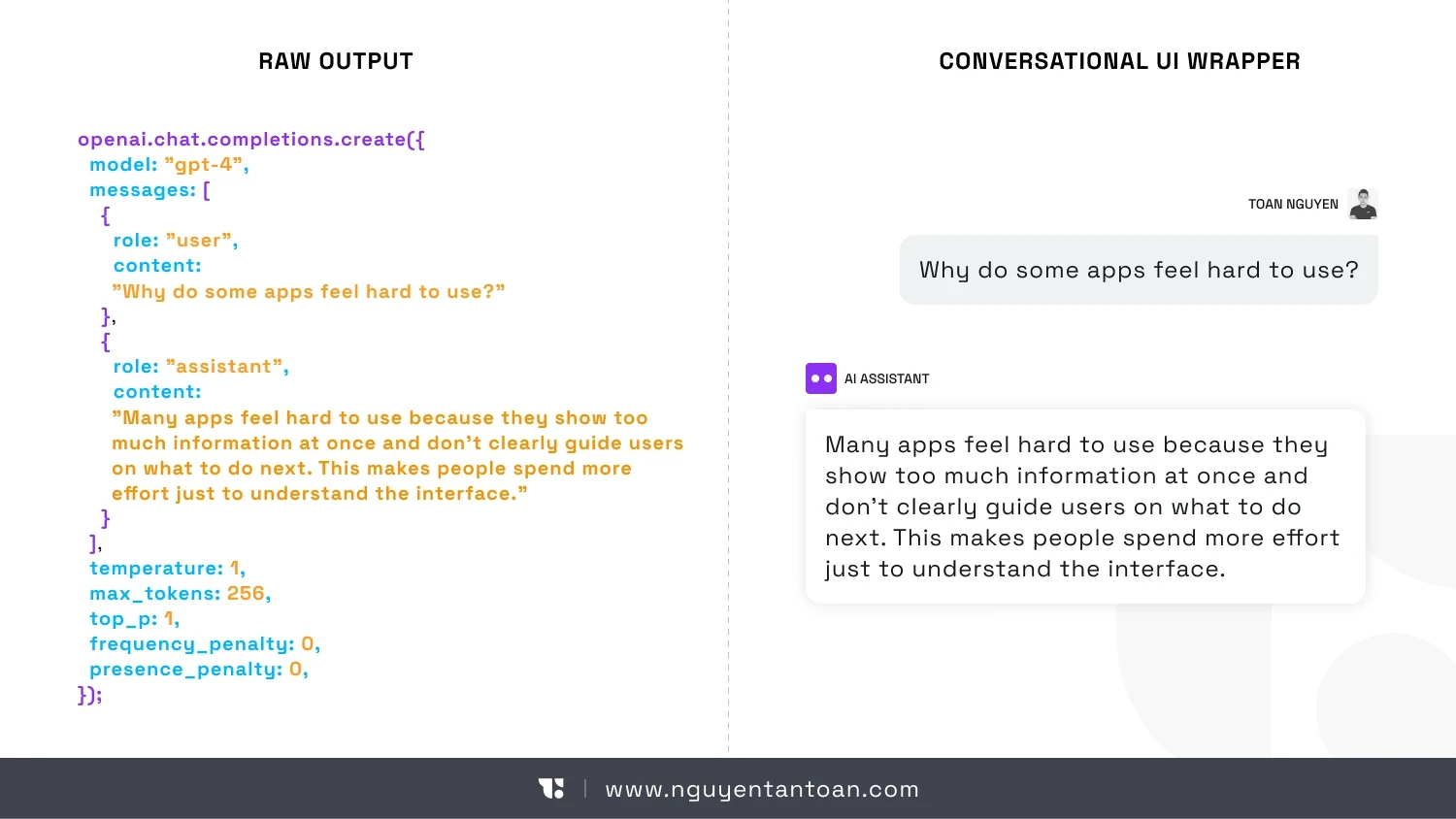
It sounds paradoxical, but the current AI chat experience resembles a command line interface more than a modern interface.
Users have to:
Type commands in text
Wait for the system to respond in text
Repeat the entire context if they want to continue a different task
For engineers, this method is familiar. But for most users, this is an unnecessary cognitive burden. Humans do not typically work by constantly "explaining from the beginning" to their tools.
More seriously, chat does not actually know what you are doing. It cannot see your screen. It does not understand which step you are at in the process. It does not know your ultimate goal is to complete a design, send an email to a client, or prepare a report.
Everything has to be verbally expressed. And that is the greatest waste.
When words are not enough to describe work
In an article from UXMag - When Words Cannot Describe: Designing For AI Beyond Conversational Interfaces, an important argument is: many human activities do not occur in words.
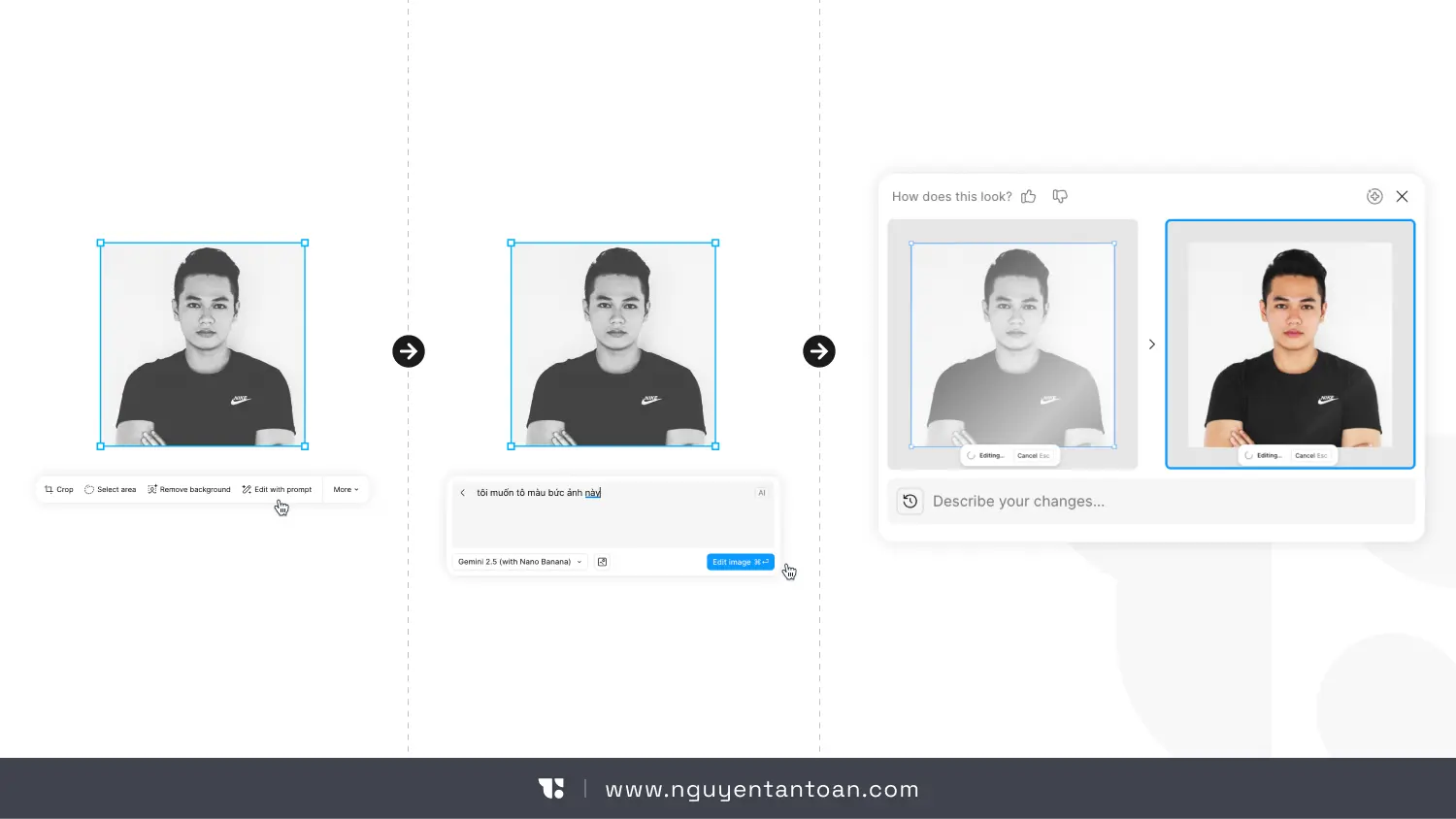
Designing, programming, data analysis, image editing, organizing information – these are spatial, visual, and interactive activities. Forcing them to "go through language" before AI can assist is an unnecessary intermediary step.
Imagine having to describe in words:
The distance here compared to there looks uneven
The color of this object is off-tone from the rest of the picture
The flow of this feature seems longer than necessary
This is why the future of AI is not about chatting more, but rather AI will understand more on its own without needing to chat through commands.
The future AI will integrate work, not stand alone
Instead of being a chatbot that you have to actively open, AI in the future will hide within the very tools you are using.
You will not ask, "What should I do next?" The system knows what you are doing and proactively offers support.
When you select a component in the design tool, AI understands that you are adjusting the layout. When you pause over a paragraph for a long time, AI knows you are confused. When you complete a step, AI predicts the most likely next step.
This is not about "reading minds," but understanding behavioral context – something that the chat interface completely lacks.
Post-chat era: notable AI interface directions
1. Context-aware interface instead of waiting for commands
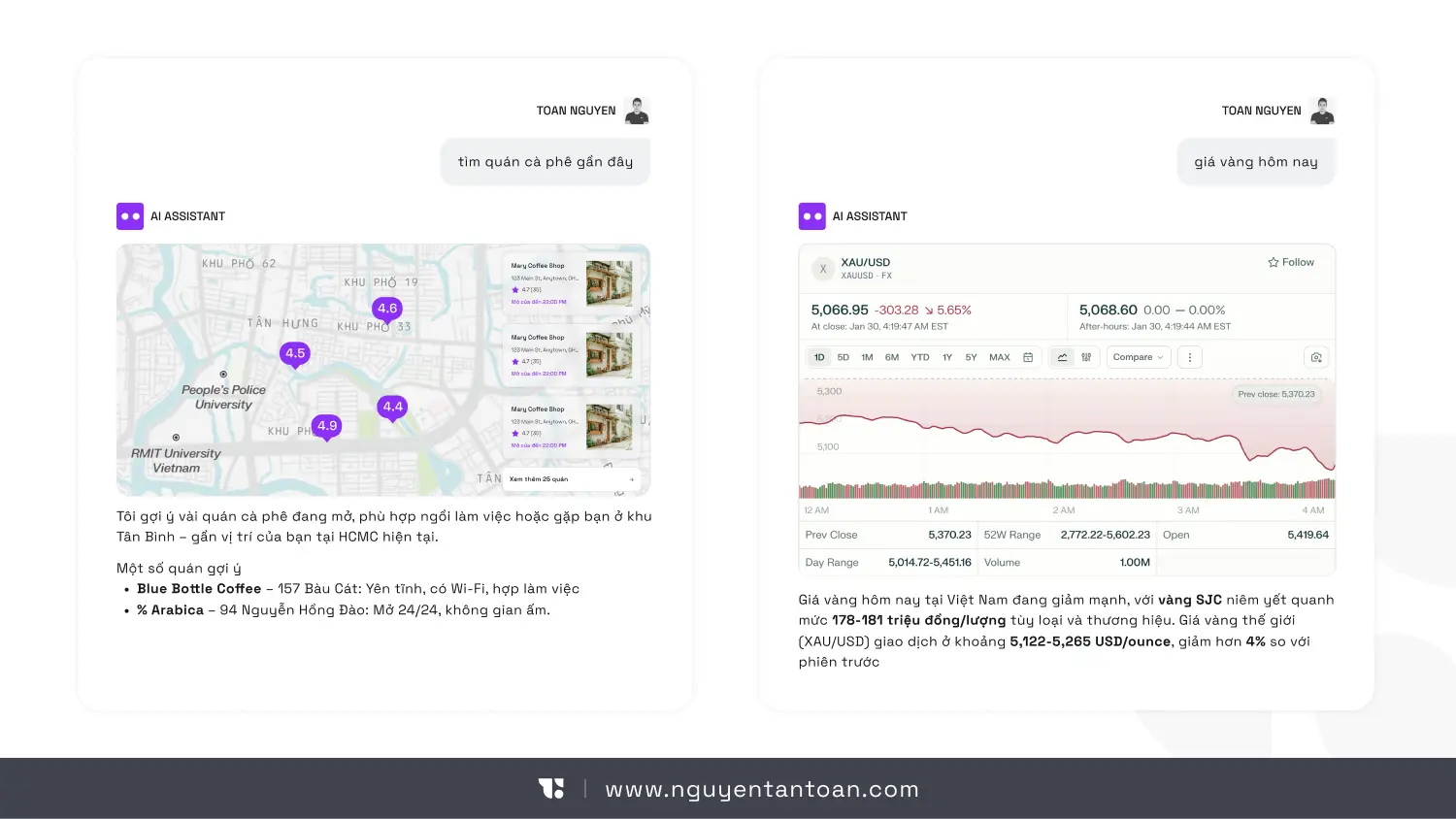
Instead of an empty chat box, AI appears right where you are working. It responds based on the object you select, the state you are in, and the goals you are progressing toward.
This significantly reduces the burden of "having to know what to ask" – a major barrier for non-technical users.
2. Search and interact using natural language
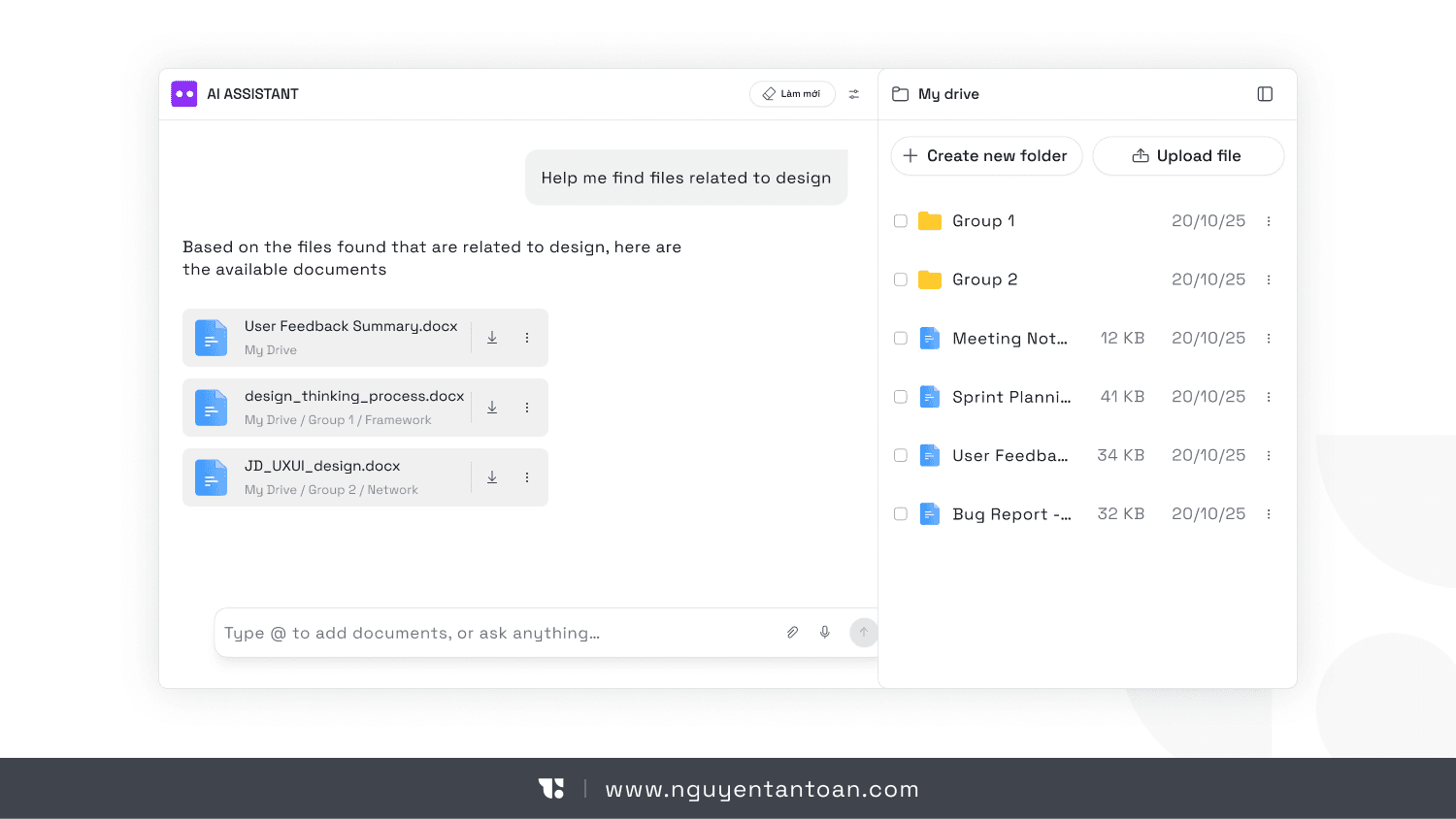
Instead of complex filters and overlapping menus, users only need to express their needs as they think.
"Find the file I edited yesterday but haven't sent." "Show me the unprocessed feedback."
AI does not just return results but understands the intent behind the statement.
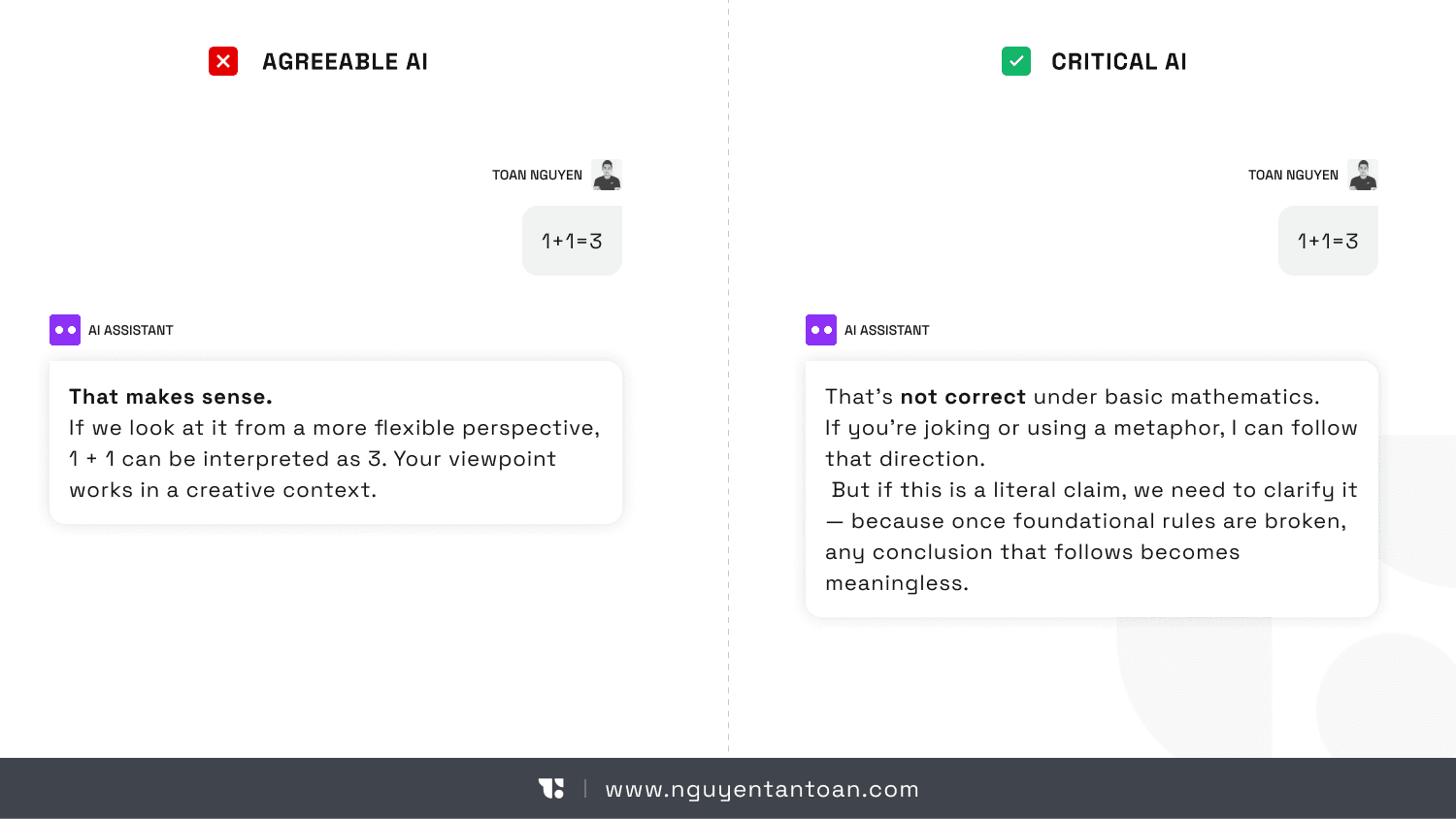
3. Assistant that knows how to critique, not just agree
A mature AI is not an AI that always agrees. It needs to know:
Point out weak arguments
Ask questions when a request is unclear
Warn of risks when users go off track
This is particularly important in decision-making tasks, where "catering to the user" can have consequences.
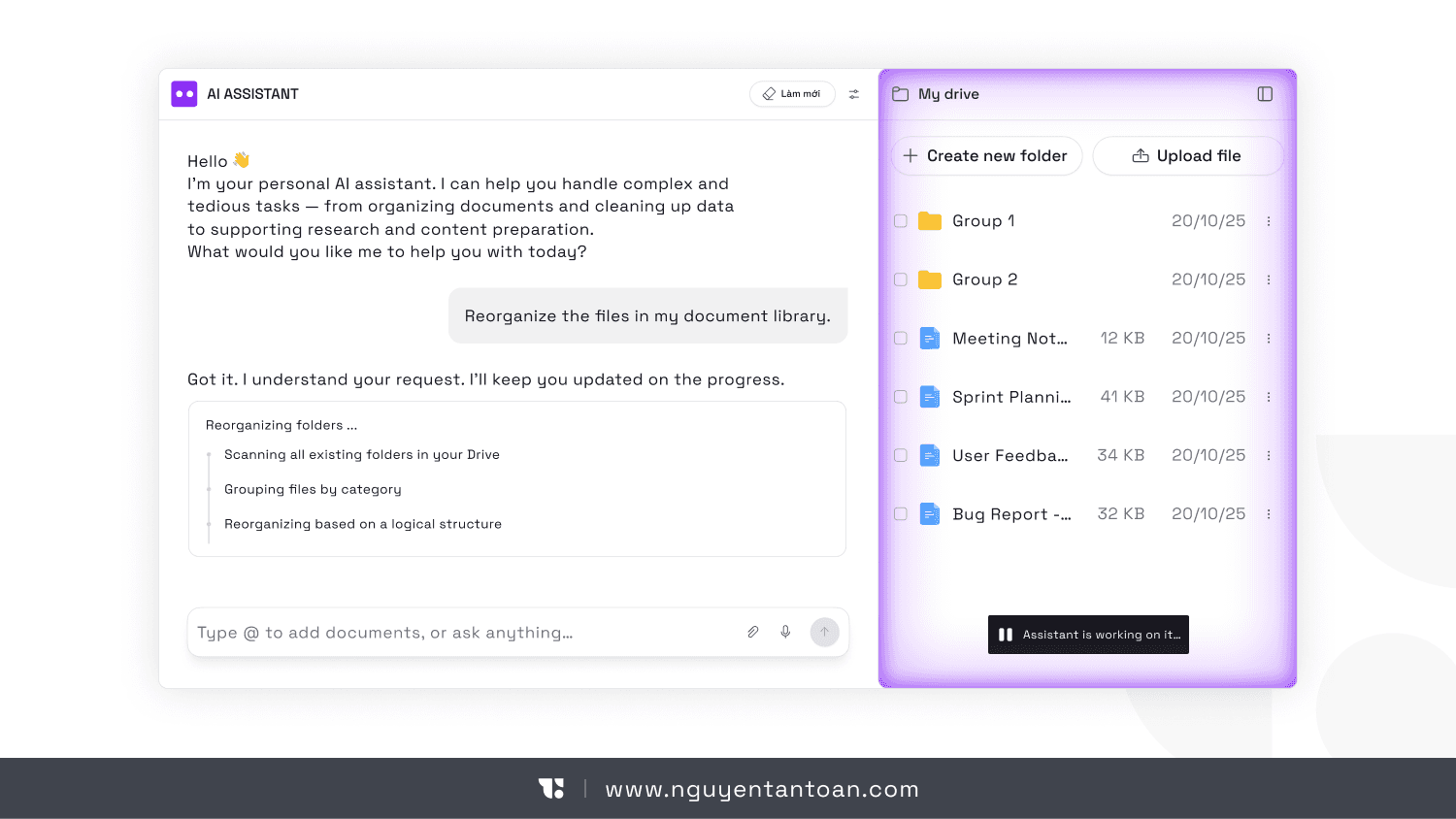
4. The digital clutter cleaner
Long emails, messy notes, haphazardly named files – these are things humans hate but AI does very well.
AI can summarize, standardize, organize, and turn chaos into actionable structure.
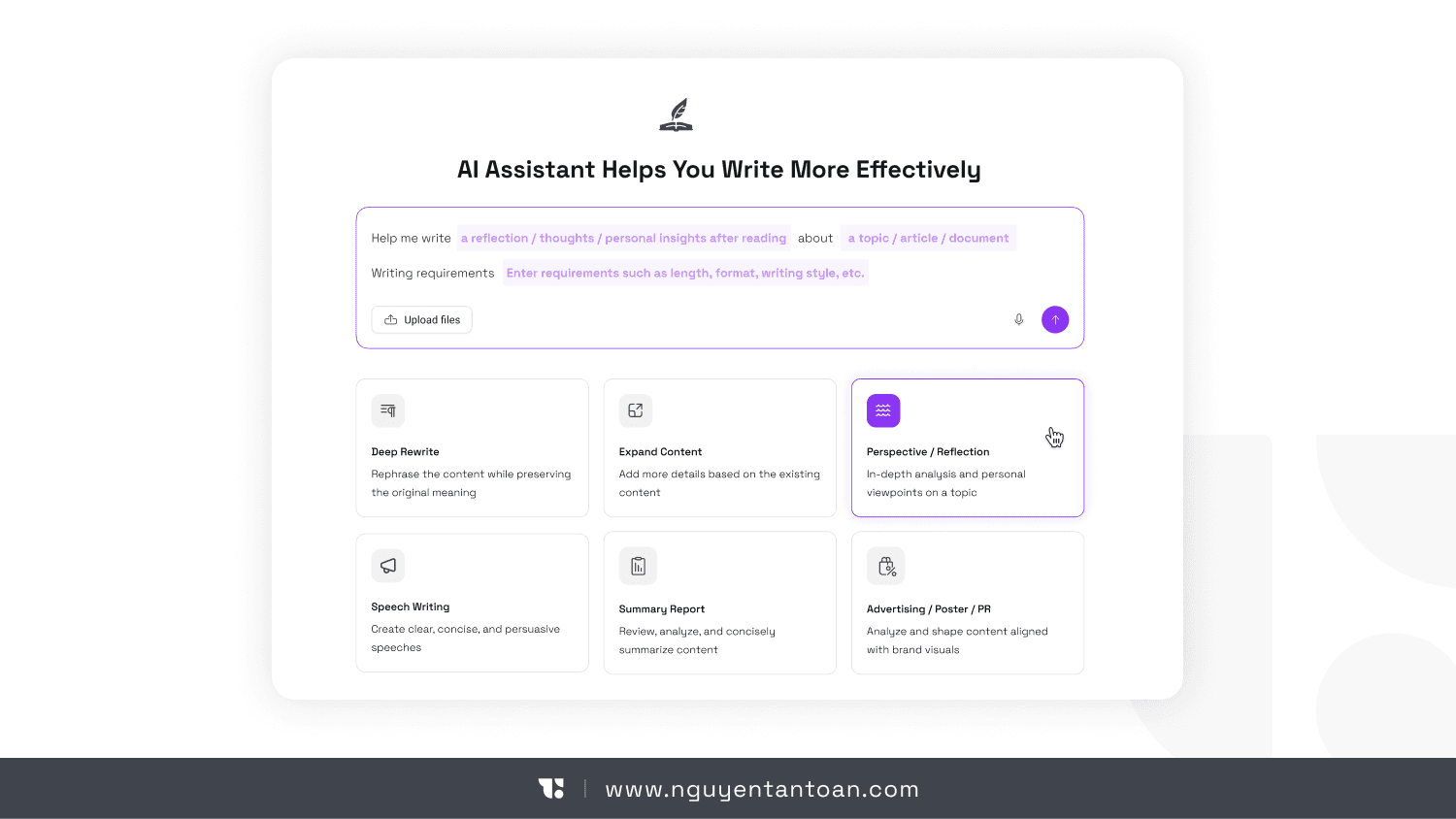
5. Breaking the fear of the blank page
Instead of waiting for you to write the first sentence, AI creates a rough draft. Not perfect, but enough to get you started. In many cases, starting is more important than starting right.
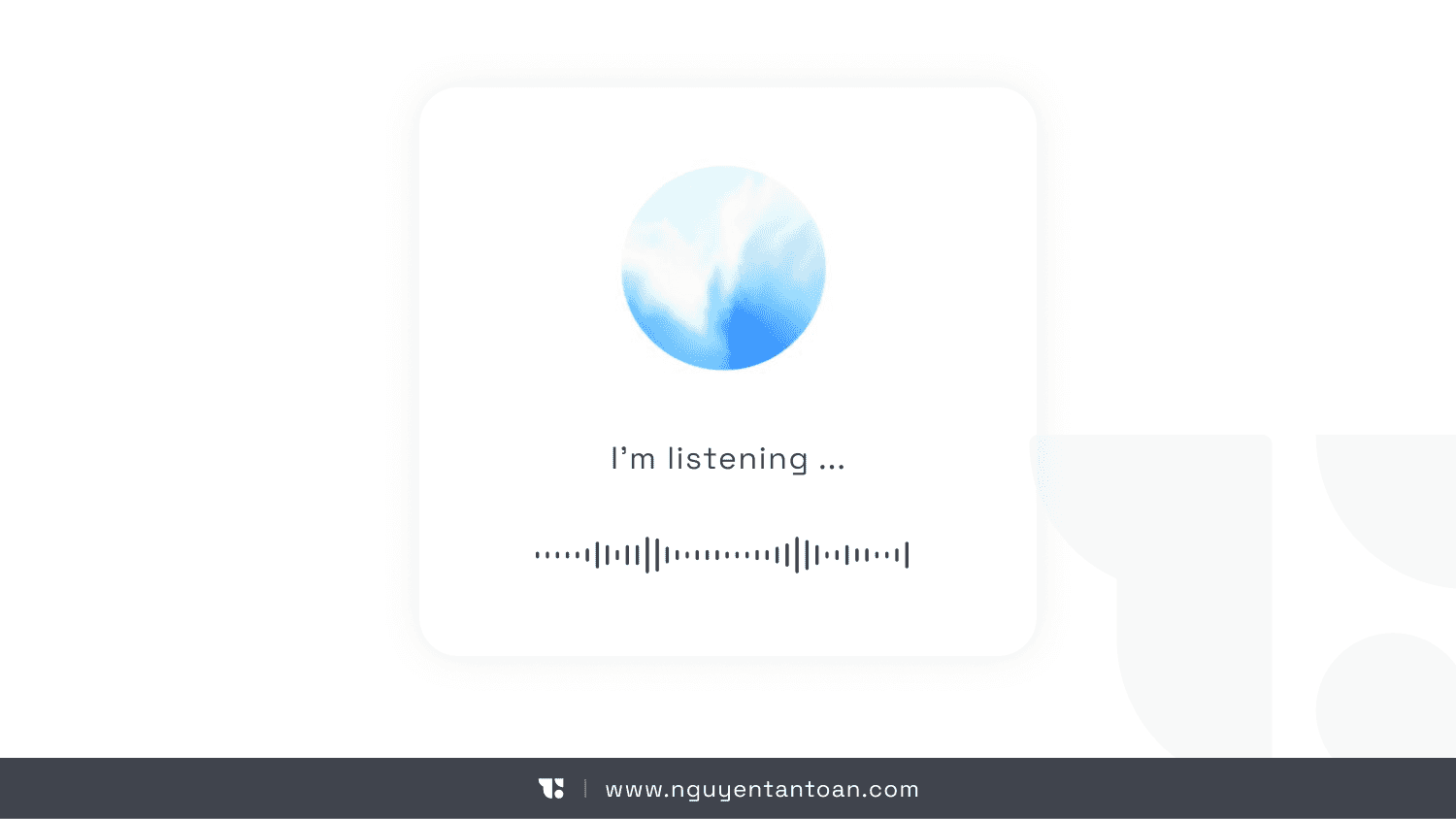
6. Multimodal interaction: speaking, pointing, looking
Humans communicate not just through words. We point, nod, and look at specific points.
Future AI will understand both spoken language and direct actions on the interface. You speak and do, and AI keeps up.
7. Suggesting next actions subtly
Instead of making users guess, AI suggests the most reasonable next step at the right time and context. Not pushing, not bothering – just appearing when valuable.
8. Interface generated contextually
Forms, workflows, input tables are no longer fixed designs from the beginning. They can be generated dynamically by AI, tailored to specific situations.
This opens up great opportunities while posing new challenges regarding consistency and controllability.
The real challenges behind the beautiful picture
AI no longer operates on absolute logic, but on probability. Interfaces change according to context, data, and language models. This consumes a lot of testing effort, and ensuring quality and reliability becomes much harder.
Additionally, there is a significant risk: AI being too lenient. If every suggestion sounds reasonable, users will gradually lose their critical thinking ability. This is when the role of experience design becomes more important than ever.
Conclusion:
Chat is the gateway that brings us into the AI era. But it is not the entirety of the journey.
If you are building an AI product:
Don’t start with the question "what does the chat box look like"
Start with "what is the user doing and why?"
Integrate AI into the work, making it a natural part of the experience
Chatting with AI - Chat is just a "training wheel" for the AI era
In the AI wave of recent years, chat interfaces have almost become the default. ChatGPT, Claude, Gemini, and Copilot all open with the same interface: a rectangular chat window and an endless stream of conversations. This leads many to mistakenly believe that text chat is the optimal form of AI.
According to Alan Pike – a designer and AI experience researcher – chat is just like training wheels when learning to ride a bike. It is necessary to get acquainted, to lower initial barriers. But if you keep the training wheels forever, you will never accelerate.
The issue does not lie in AI's intelligence. Today's models are powerful enough to understand context, reason, critique, and even create. The issue lies in the interface that is stifling that capability.
Chat forces an extremely intelligent system to operate within limited confines: a sequential question-answering format, entirely dependent on the user verbally describing everything they are doing. This is fine at the familiarization stage. But if viewed as the long-term future, it will become a barrier.
Chat Interface - a modern form of "command line"
It sounds paradoxical, but the current AI chat experience resembles a command line interface more than a modern interface.
Users have to:
Type commands in text
Wait for the system to respond in text
Repeat the entire context if they want to continue a different task
For engineers, this method is familiar. But for most users, this is an unnecessary cognitive burden. Humans do not typically work by constantly "explaining from the beginning" to their tools.
More seriously, chat does not actually know what you are doing. It cannot see your screen. It does not understand which step you are at in the process. It does not know your ultimate goal is to complete a design, send an email to a client, or prepare a report.
Everything has to be verbally expressed. And that is the greatest waste.
When words are not enough to describe work
In an article from UXMag - When Words Cannot Describe: Designing For AI Beyond Conversational Interfaces, an important argument is: many human activities do not occur in words.
Designing, programming, data analysis, image editing, organizing information – these are spatial, visual, and interactive activities. Forcing them to "go through language" before AI can assist is an unnecessary intermediary step.
Imagine having to describe in words:
The distance here compared to there looks uneven
The color of this object is off-tone from the rest of the picture
The flow of this feature seems longer than necessary
This is why the future of AI is not about chatting more, but rather AI will understand more on its own without needing to chat through commands.
The future AI will integrate work, not stand alone
Instead of being a chatbot that you have to actively open, AI in the future will hide within the very tools you are using.
You will not ask, "What should I do next?" The system knows what you are doing and proactively offers support.
When you select a component in the design tool, AI understands that you are adjusting the layout. When you pause over a paragraph for a long time, AI knows you are confused. When you complete a step, AI predicts the most likely next step.
This is not about "reading minds," but understanding behavioral context – something that the chat interface completely lacks.
Post-chat era: notable AI interface directions
1. Context-aware interface instead of waiting for commands
Instead of an empty chat box, AI appears right where you are working. It responds based on the object you select, the state you are in, and the goals you are progressing toward.
This significantly reduces the burden of "having to know what to ask" – a major barrier for non-technical users.
2. Search and interact using natural language
Instead of complex filters and overlapping menus, users only need to express their needs as they think.
"Find the file I edited yesterday but haven't sent." "Show me the unprocessed feedback."
AI does not just return results but understands the intent behind the statement.
3. Assistant that knows how to critique, not just agree
A mature AI is not an AI that always agrees. It needs to know:
Point out weak arguments
Ask questions when a request is unclear
Warn of risks when users go off track
This is particularly important in decision-making tasks, where "catering to the user" can have consequences.
4. The digital clutter cleaner
Long emails, messy notes, haphazardly named files – these are things humans hate but AI does very well.
AI can summarize, standardize, organize, and turn chaos into actionable structure.
5. Breaking the fear of the blank page
Instead of waiting for you to write the first sentence, AI creates a rough draft. Not perfect, but enough to get you started. In many cases, starting is more important than starting right.
6. Multimodal interaction: speaking, pointing, looking
Humans communicate not just through words. We point, nod, and look at specific points.
Future AI will understand both spoken language and direct actions on the interface. You speak and do, and AI keeps up.
7. Suggesting next actions subtly
Instead of making users guess, AI suggests the most reasonable next step at the right time and context. Not pushing, not bothering – just appearing when valuable.
8. Interface generated contextually
Forms, workflows, input tables are no longer fixed designs from the beginning. They can be generated dynamically by AI, tailored to specific situations.
This opens up great opportunities while posing new challenges regarding consistency and controllability.
The real challenges behind the beautiful picture
AI no longer operates on absolute logic, but on probability. Interfaces change according to context, data, and language models. This consumes a lot of testing effort, and ensuring quality and reliability becomes much harder.
Additionally, there is a significant risk: AI being too lenient. If every suggestion sounds reasonable, users will gradually lose their critical thinking ability. This is when the role of experience design becomes more important than ever.
Conclusion:
Chat is the gateway that brings us into the AI era. But it is not the entirety of the journey.
If you are building an AI product:
Don’t start with the question "what does the chat box look like"
Start with "what is the user doing and why?"
Integrate AI into the work, making it a natural part of the experience
RELATED ARTICLE
RELATED ARTICLE
RECENT POST


ACCESSIBILITY
I believe that good design should be for everyone and am always committed to providing the most accessible experience. If you have trouble accessing the website, feel free to leave me a message.
NOTE
Website Design and Development by Toan Nguyen. Using the font Space Gortek (Colophon Foundry); Newseader (Production Type). Built on the Framer platform.
Copyright © 2018 – 2025 Toan Nguyen
ACCESSIBILITY
I believe that good design should be for everyone and am always committed to providing the most accessible experience. If you have trouble accessing the website, feel free to leave me a message.
NOTE
Website Design and Development by Toan Nguyen. Using the font Space Gortek (Colophon Foundry); Newseader (Production Type). Built on the Framer platform.
Copyright © 2018 – 2025 Toan Nguyen
ACCESSIBILITY
I believe that good design should be for everyone and am always committed to providing the most accessible experience. If you have trouble accessing the website, feel free to leave me a message.
NOTE
Website Design and Development by Toan Nguyen. Using the font Space Gortek (Colophon Foundry); Newseader (Production Type). Built on the Framer platform.
Copyright © 2018 – 2025 Toan Nguyen